
From floppy disks to memory cards, discs to drives, we used to think of memory as physical objects. Most government departments have moved towards cloud storage, which feels as nebulous as it sounds. Everything is backed up to ‘the cloud’, but what does that mean?
In practice, we’re renting space in a data centre instead of buying physical assets. The tangible knowledge that we’re soon going to ‘run out of space’ has been replaced with a feeling of security and a sense of limitlessness of the cloud. Unfortunately, it also means a monthly charge for every gigabyte that we create.
As civil servants, we have a duty to continually monitor and assess our spending on products. We have an obligation to demonstrate value for money to the taxpayer and ensure that we are operating efficiently. To this end, our team set out to explore our SharePoint storage, interrogate the default settings and identify where we could trim and improve our digital storage.
SharePoint version history
We discovered that about 66% of our SharePoint storage was made up of version history. In the background, SharePoint quietly makes copies (versions) of files as you work. Each time a document or spreadsheet is edited, a version is created and added to the SharePoint storage. If nothing is done, these versions can build up. Some of our libraries were storing up to 500 versions of each file.
In some situations, maintaining a document history this detailed and comprehensive is valuable. For example, for Trade Negotiations, we would likely want to see every change that we've made to our documents, so that we can see how our approach has changed over time.
In most cases, most of the previous versions will never be needed. We saw an opportunity to reduce our storage costs with minimal interruption to the department’s work, by tackling the version history.
We did this in 2 stages:
- Version trimming
We would delete many of the previous versions of files, retaining a small proportion and preserving the live file. - Changing our policy for version control
To prevent too many versions building up in the future, we would change the SharePoint settings to retain less frequent snapshots of files.
Microsoft has a comprehensive blog on the technical steps for version control, but knowing which settings to navigate is only half the problem. This was an exercise in communicating and managing expectation. We worked with the Knowledge and Information Management (KIM) team to identify and retain essential information and reassure our users that from their perspective the impact of the work would be minimal.
Preparing for version trimming: research, engagement and testing
Given that version trimming was a big change to our SharePoint information management policy, we had to ensure due diligence by:
- engaging across other government departments to see if there was established precedent
- gaining approval from an internal governance board
- taking advice from our legal advisors and change management teams
- alerting our Service Desk to monitor for any potential unintended impacts
Initial research revealed 2 arm's length bodies that reported a reduction in their SharePoint storage of 10% and 37% respectively from version trimming.
Given we were the first central department (that we’re aware of) to attempt version trimming, we decided to pilot the approach on 11 inactive SharePoint sites selected by the KIM team. This showed us what to expect and allowed us to tweak our approach before rollout.
We learned from the pilot that version trimming could run successfully in DBT, with indicative space savings of around 10% per site. After careful evaluation of the lessons learned from the pilot, we moved on to establishing our scope. This was identifying which SharePoint sites we should run the version trimming on, and which would be excluded. We consulted with various teams (including KIM and the Free Trade Agreements Project Management Office) to identify any SharePoint sites that should be out of scope.
Consulting our users
We launched a communications campaign to raise awareness of our planned activity, to capture feedback and to allow colleagues to raise exemption requests. We delivered the campaign through an interactive Power App. The app kept all incoming and outgoing information about the activity in one place and reduced time spent answering questions and gathering feedback. Allowing users to raise exemption requests through the app helped mitigate the risk of deleting versions that ought to be kept. Creating a feedback channel ensured that concerns were logged before they were escalated, minimising the risk to the project.
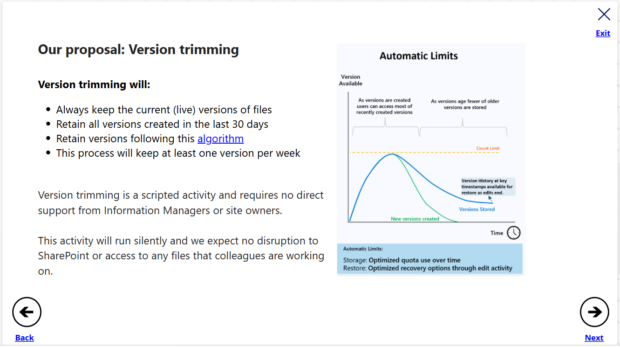
Our goal was to reassure colleagues that in most cases, version trimming would not produce any noticeable changes to their work. For those that needed a more comprehensive version history, the exemption request system allowed them to engage with us and prevent unintended information loss.
We faced significant challenges preparing for the consultation including:
- making the app accessible
- meeting Government Digital Standards
- writing for a non-technical audience
- leading users to provide accurate information that was correctly styled and formatted - this was critical for ensuring that the consultation delivered clear outputs in a short space of time
Launching a departmental consultation was no small feat, but necessary to mitigate user concerns and identify any additional SharePoint sites that should be out of scope.
How successful was the version trimming?
The version trimming activity ran for over a week, and our analysis shows that we reduced our storage by approximately 60 terabytes. This is the equivalent of around 240 million pages of information (or 167,000 copies of War and Peace). We estimate that this was a 44.2% reduction in storage for the scoped sites. This had a significant impact on our contract renewal with Microsoft, ensuring that we did not waste money on unnecessary storage.
No negative impacts were reported, no Service Desk tickets were raised and there were no signs that the versions that were trimmed were missed. We had saved significant cost without interrupting business as usual.
We’ve also changed the technical policy in SharePoint, so we will continue to realise further savings over time as versions of files age. They will slowly be ‘thinned out’, so the department will no longer be keeping everything by default. The result should be a lower rate of SharePoint storage growth.
What more could be done?
This work demonstrates how we commit to value for money for the taxpayer at BIST, and how we keep considered public spending at the centre of our work. This is something all civil servants can and should do.
Across government, we are likely to be storing petabytes of information. I hope this blog inspires our peers to continue prioritising the important work of interrogating spend and continuously working to improve efficiency.
Conclusion
Being an engineer with an idea is one thing, but it takes a lot of support to deliver a project of this scale. We started with the ambition to reduce our departmental storage costs, and we were given time and space to develop the idea into workstreams.
It’s a fantastic achievement for the teams involved, and we’re proud that our work has delivered a notable cost saving for the department. We strongly encourage other departments to do the same.
If you have been inspired to see if version trimming could save your organisation money, we recommend:
- engaging your KIM and Legal teams early
- running a pilot on a small number of SharePoint sites
- creating a clear consultation and exemption process
If you need advice or support getting started with reducing your organisation’s digital storage without losing information, get in touch in the comments.

4 comments
Comment by Ann Fletcher posted on
wow this is fantastic!
Comment by J whewel posted on
Why are you not looking at Microsoft research where data is stored on glass via laser at microscopic levels……no need to build the controversial and damaging to health and the environment data Centres. Wouldn’t it be great for the UK to be in front of the curve instead of behind it with in this example out of date storage facilities by the time they are built.
Comment by Tyler Shepherd posted on
The Department for Business, Innovation, Science and Trade (BIST) uses Microsoft 365 as a cloud-based service and does not operate Microsoft 365 data centres or host any on-premises data storage facilities for its Microsoft tenants. BIST relies on Microsoft for the underlying storage technologies and infrastructure, including decisions on future storage innovations.
Comment by C Brown posted on
This is a great piece of work. Interested in discussing with your team about what lessons we can learn.