
Charlotte Saxby
“If everyone is moving forward together, then success takes care of itself.” - Henry Ford
In a recent blog on digital change, my colleague, Stephanie Chaytor, highlighted why leading with a human-centered approach is essential for success. Here I will discuss how we put those principles into practice for DBT’s Windows 11 upgrade.
In the last few years, Microsoft announced that security updates for Windows 10 were due to end in October 2025, paving the way for Windows 11. And rightly so, Windows 11 provides us with more security features to keep us digitally safe, including ways to help us work more efficiently. Windows 11 offers a modern experience designed to meet current demands for heightened security.
In the Department for Business and Trade (DBT), this meant we needed to upgrade laptops still running on Windows 10 to Windows 11 before the October deadline.
The emotional landscape of change
When going through change, people need time to understand in their own way what exactly is happening and how it will affect them personally.Our modern way of working means we rely almost exclusively on technology to do our jobs.
Technical changes especially can bring about uncertainty for many people.For those still unsure of using technology to its full capacity, it can take time to get used to how things work. We build habits and routines to forge our own ways of using tools and systems. So, it makes sense that people can become extremely concerned when we tell them that their ways of working are about to change, and they will need to build them up again from scratch.
It’s important to understand and anticipate what people might be thinking and feeling. We need to listen to feedback, acknowledge concerns and work to alleviate these. We should remain empathetic and create safe and open spaces for people to ask questions. After all, everybody is embarking on the same journey, and we cannot leave anyone behind.
Many activities implemented in this project were taken out of learnings from DBT’s Machinery of Government (MoG) programme. This isn’t the first time a digital change has taken place in DBT and it won’t be the last. It’s important we capture what works well and continue to build on it for the future.
Our approach
We made sure the Windows 11 upgrade programme was shaped by user-centred design from the beginning. By breaking actions into manageable steps, presenting information in multiple formats, and providing flexible, responsive support, we could make the experience as clear and positive as possible for colleagues.
Creating awareness around the Windows 11 upgrade and why it was important to DBT, alongside demonstrating the positive changes to enable smarter working allowed colleagues to understand and move with the changes more easily. The team worked closely with our user researcher who helped us identify the kind of worries colleagues may be feeling. From this we could build out communications to reassure everyone from the beginning. User research identified that colleagues generally fell into 3 broad categories:
- the advocate
- the engaged
- the cautious
To make sure colleagues felt empowered by the changes and encourage them to engage with the upgrade process, we put a few things into place.
Early communication that acknowledges uncertainty from the start
Whilst this upgrade was a huge change affecting thousands of colleagues, we were clear with our messaging as to what was happening. The what, the why, the benefits and reassurance that Windows 11 was not too dissimilar from Windows 10. We made sure to target colleagues about their specific upgrade type with what it meant for them and what they needed to do.
We worked with data analysts to create a dashboard so colleagues could see for themselves whether their laptop required upgrading and what type of change they would experience. This meant people could feel reassured and in control from the start and was extremely helpful in allowing colleagues to find their own path.
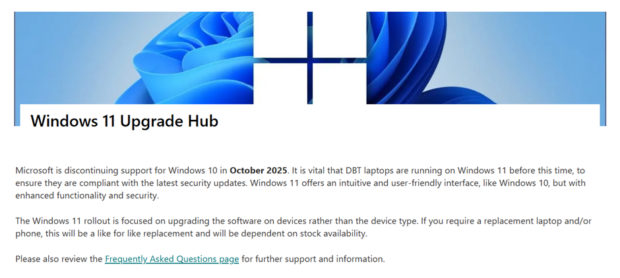
We also created a ‘Windows 11 Hub’; a single source for all information related to the upgrade. It was kept up to date with any new changes or guidance as it emerged and we learned what colleagues needed. The Hub received over 2,000 unique views and colleagues found it highly valuable. They liked that it was “very comprehensive”, “clearly outlines the steps to take” and that it was “written in a non-technical language”.
Flexibility
We understood people were busy and a physical upgrade did not just mean swapping one laptop for another. It involved up to 2 hours of waiting for updates and signing back into accounts. To alleviate the impact, we offered colleagues a range of times and locations to complete their upgrade and the option to cancel and reschedule around their own diaries.
This flexibility was well received; one colleague shared that it was “great that the team came to our hub to do this”.
Whilst we were thinking about the users from the start of the project, we also needed to be ready to iteratively adapt to their needs as the upgrade progressed. There were always questions you could not predict. Remaining open and understanding allowed us to support real colleague needs, not just technical requirements.
A human voice
The advocates and engaged were happy to take this information and run with it. Some people were even looking forward to the upgrade! However, for the cautious, we needed to provide a path of reassurance. We made sure we were there to answer any questions they had via a range of forums. From FAQs to an active inbox or a Teams call, we were ready to listen, troubleshoot or just be understanding. Cautious colleagues had concerns about replacement hardware, what files and work they could lose and how long the process might take. Being proactive allowed us to alleviate worries quickly and in the moment.
Our post‑upgrade survey showed that 70% ofcolleagues felt everything worked as expected after their upgrade. This reinforced that early reassurance and open communication had a meaningful impact.
Prioritising accessibility
Being aware of all types of users from the beginning and assisting them when needed was a huge benefit. We provided guidance and instructions through a variety of accessible formats from downloadable word documents to video guides. All teams involved were ready to provide extra support for those who needed it to help everybody feel valued and supported. We worked closely with accessibility teams to ensure that colleagues with extra software, such as screen readers, had these installed on their replacement laptop when they made the switch. We also had a clear plan for colleagues with reasonable adjustments or those unable to make it to a DBT office.
One colleague told us it was “Good to immediately see there is a team to contact for assistive technology questions”. Another confirmed the Upgrade Hub “works well with my assistive tech”, which helped to build trust in the process.
Celebrating the positives
We organised webinars with an external training provider, attended by over 500 colleagues, to showcase new Windows 11 features. This helped DBT colleagues feel more prepared for the change and more confident after their upgrade. We weren’t just pushing a new change onto people but adapting it to show how it could help them work more efficiently.
Conclusion
The Windows 11 upgrade was a change for the better, but it also meant DBT needed to change with it. When we talk about upgrades, we often focus on the tech: new features, faster performance, better security. However, the DBT Windows 11 rollout has reminded us that technical change is also emotional change. How we support people through it matters just as much as the upgrade itself. We have, of course, taken many learnings from this project and will continue to improve how we deliver changes like this to our colleagues in future. Behind every laptop is a real person, reminding us that change isn’t about systems, it’s about people.
If you're working on a digital change in your team, I hope these insights help you bring your whole team on the journey. Share how you’ve put people‑centred change into practice in your own work in the comments below.

1 comment
Comment by Seb Moore posted on
Always impressed by these blog posts from DBT! Thank you for sharing your thoughts on Digital Change and always ensuring users with additional needs are at the heart of your adoption and change strategies. #Inclusive #Accessible